


Hospital Laptop Security: Locking Down Workstations in Healthcare Facilities
Why Every Hospital Workstation Needs Laptop Security
Hospitals run on laptops. Nurses chart at bedside workstations. Registration staff check in patients at front desks. Clinicians review imaging on portable carts. Every one of those laptops is a target for theft and a liability if it walks out the door with protected health information on it. The HIPAA Security Rule requires covered entities to implement physical safeguards for electronic protected health information, and an unlocked laptop in a shared space is a gap auditors notice.
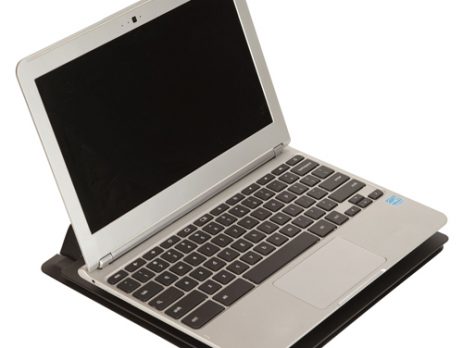
Hospital laptop security starts with physically locking the laptop to the surface it sits on. A steel security stand bolted or adhesived to a desk, wall, or medical cart prevents the laptop from being disconnected, dropped, or carried away. Business Machine Security (BMS) manufactures laptop security stands and mounting systems designed specifically for healthcare environments. Every unit is built from steel in the USA and ships with dual locking mechanisms.
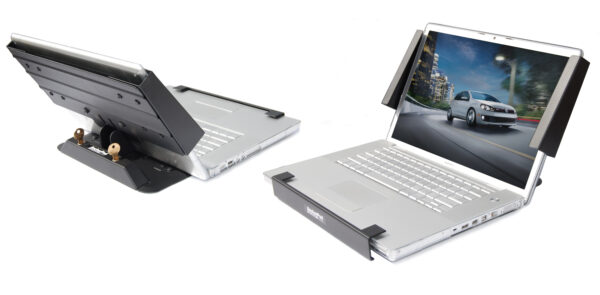
Hospital Laptop Security Options: Stands, Plates, and Cart Mounts
BMS offers multiple hospital laptop security solutions depending on where the laptop lives and how it needs to mount. Here is a comparison of the main product lines:
| Product | Best For | Mount Type | Fits Laptops | Price |
|---|---|---|---|---|
| Laptop Security Stand (VESA) | Desks, wall arms, reception | VESA 75/100 arm | 11.5″ to 18″ wide | $149.99 |
| Laptop Security Stand (Adhesive) | Desks, counters, flat surfaces | Adhesive (20,000 lb bond) | 11.5″ to 18″ wide | $169.99 |
| Pole Mount Arm Combo Kit | Medical carts with pole | 1.375″ pole clamp + VESA | 11.5″ to 18″ wide | $269.98 |
| AnchorPad 1110 Double Plate | Closed-lid laptops, mixed equipment | VESA arm or adhesive | Any size (flex pads) | $119.99 |
| AnchorPad 1110 Single Plate | Simple desktop lockdown | VESA arm or adhesive | Any size (flex pads) | $99.99 |
All five options use steel construction and dual locking mechanisms. The choice comes down to three factors: where the laptop mounts, whether it needs to stay open during use, and how many units you are deploying.
Medical Cart Laptop Mounts
Hospital laptop security on medical carts is the most common request BMS receives from healthcare facilities. Nurses and clinicians use laptop carts for bedside charting, medication administration, and patient intake. The cart moves between rooms, but the laptop should never leave the cart.
The Pole Mount Arm Combo Kit ($269.98) is a complete hospital laptop security solution for carts with a standard 1.375-inch diameter pole. The kit includes the AnchorPad Laptop Security Stand (31177 ASL) and a pole-mountable articulating arm. The arm slides onto the pole and clamps in place with a hex screw. Key specs:
- 360-degree rotation for positioning the laptop at any angle
- Adjustable height and tilt
- Holds loads from 2 to 18 pounds
- Tamper-resistant screws secure the stand to the arm
- Laptop screen tilts back to 120 degrees while locked
- Dual screw-type locks prevent unauthorized removal
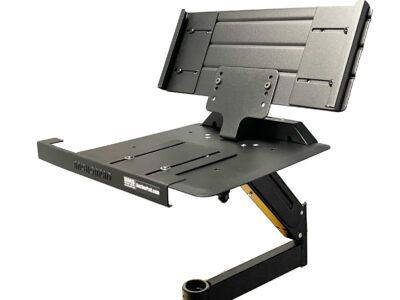
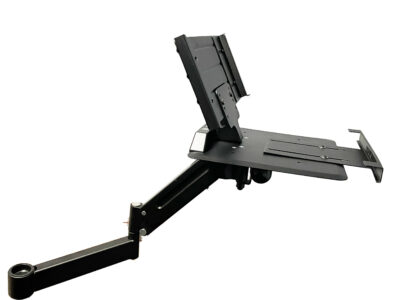
For carts without a pole mount, the Laptop Security Stand with VESA Mount ($149.99) attaches to any VESA 75/100 compatible arm. BMS sells a Heavy Duty GS Flex Arm ($329.99) that clamps to the side of a cart, desk, or wall for a complete setup.
Desktop and Wall-Mounted Laptop Stands
Not every hospital laptop sits on a cart. Registration desks, triage stations, physician offices, and break rooms all have laptops on flat surfaces that need hospital laptop security.
The Laptop Security Stand with Adhesive Mount ($169.99) is the fastest option for desks and counters. Peel the backing off the high-bonding adhesive base, press it onto the surface, slide the laptop in, and lock it. The adhesive delivers 20,000 pounds of anchoring strength on smooth surfaces. No drilling required, which matters in leased hospital spaces where you cannot modify furniture.
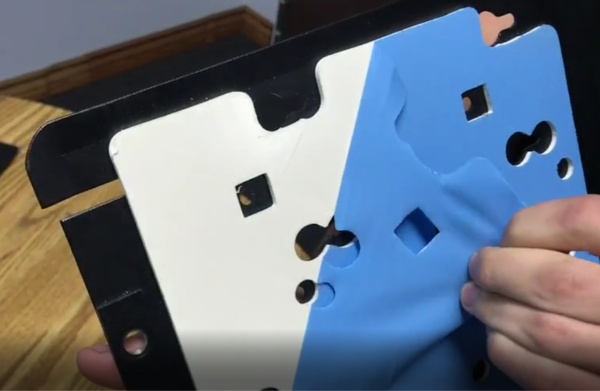
The adhesive mount version uses the same steel stand and dual screw-type locks as the VESA version. Both fit laptops from 11.53 inches to 17.96 inches wide and 7.6 inches to 13.03 inches deep. The laptop screen remains open and tilts back to 120 degrees while locked. Users slide the laptop in and out in seconds when it needs to travel.
For wall-mounted workstations, pair the VESA version ($149.99) with a wall-mounted VESA arm. The arm swings out for use and folds flat against the wall when not needed.
AnchorPad Plate Systems for Closed-Lid Laptops
Some hospital workstations use laptops with the lid closed, connected to an external monitor. The Laptop Security Stand requires the screen to stay open. For closed-lid setups, the AnchorPad 1110 plate systems are the right choice.
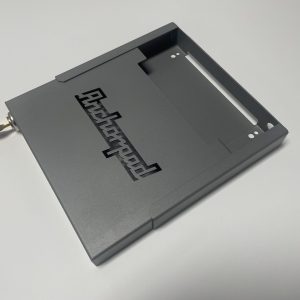
The 1110 Double Plate ($119.99) uses patented Flex Pads that glue permanently to the bottom of the laptop. The laptop snaps onto a steel grid plate, which locks to a base plate with dual wafer locks. The grid plate provides multiple attachment points, which helps when a laptop has vents or access panels on its underside that cannot be covered.
The 1110 Single Plate ($99.99) works the same way with fewer attachment points. Both plate systems mount to a VESA arm or use adhesive for flat surfaces. Both are 16-gauge steel with 20,000 pounds of adhesive anchoring force.
The tradeoff: Flex Pads are permanent. They stay on the bottom of the laptop even when unlocked. For hospital-owned laptops that stay at a fixed workstation, this is not a concern. For laptops that travel between a dock and a bag, the Laptop Security Stand (which does not permanently attach to the laptop) is the better choice.
How to Specify Hospital Laptop Security for Your Facility
When ordering for a hospital or healthcare facility, gather this information first:
- Laptop model and dimensions. Measure the width, depth, and closed-lid height. The Laptop Security Stand fits most laptops 11.5 to 18 inches wide. If your laptop is thicker than standard, call BMS at (800) 872-9562 for a fit check.
- Mount location. Cart pole, VESA arm, adhesive to desk, or wall mount. This determines which product and which mounting option to order.
- Open or closed lid. If the laptop stays open during use, the Laptop Security Stand is the right product. If the lid stays closed (docked to a monitor), use the AnchorPad 1110 plate system.
- Quantity and keying. For multi-unit hospital deployments, request keyed alike so all units use the same key. This simplifies key management for facilities and biomedical engineering teams.
Volume pricing is available for multi-unit orders. Email sales@locdown.com or call (800) 872-9562.
Frequently Asked Questions
What hospital laptop security solution works on medical carts?
The Pole Mount Arm Combo Kit ($269.98) is designed specifically for medical carts with a 1.375-inch pole. It includes the AnchorPad Laptop Security Stand and a pole-mountable articulating arm with 360-degree rotation.
Can staff still use the laptop while it is locked in the stand?
Yes. The Laptop Security Stand holds the laptop open with the screen tilted back to 120 degrees. The keyboard, trackpad, USB ports, and power connection remain fully accessible. Staff slide the laptop in and out in seconds when it is unlocked.
Does hospital laptop security require drilling into furniture?
Not necessarily. The adhesive mount version bonds to smooth surfaces with 20,000 pounds of anchoring force and requires no drilling. The VESA and plate systems can use adhesive or screw-down mounting depending on your preference.
Will the security stand fit our hospital laptops?
The AnchorPad Laptop Security Stand fits most laptops from 11.53 to 17.96 inches wide and 7.6 to 13.03 inches deep. Screen thickness must be under 0.42 inches. If your laptop is outside these ranges, call BMS at (800) 872-9562 for alternatives.
Can all units be keyed alike for a hospital deployment?
Yes. Specify keyed alike when ordering and all laptop security stands will ship with identical locks. One key opens every unit, which simplifies key management for facilities, biomedical engineering, and IT teams managing dozens or hundreds of workstations.
Secure every laptop workstation in your facility. Browse all BMS laptop security products or call (800) 872-9562 to discuss your hospital deployment. Email sales@locdown.com for multi-unit pricing.



Leave a Reply