

Mac Mini Security Enclosure for OpenClaw & AI Agents
OpenClaw turned the Mac Mini into the default hardware for running a personal AI agent. The M4 Mac Mini draws 15 watts, costs $499, and fits in a desk drawer. Thousands of people are now running OpenClaw instances 24/7 on these machines, managing everything from email triage to social media to automated research. The digital security guides are everywhere. But if someone unplugs your Mac Mini and walks out with it, your firewall configuration and FileVault settings leave with it too. A Mac Mini security enclosure bolted to your desk solves the one risk that software can’t.

BMS Mac Trap M4 — Steel locking enclosure for the 2024 Mac Mini M4
Why Always-On AI Makes a Mac Mini Security Enclosure Essential
A Mac Mini running OpenClaw isn’t just a computer. It’s an active agent with stored API keys, authentication tokens, conversation history, and access to whatever services you’ve connected: email, calendars, messaging platforms, code repositories. Physical access to that machine means access to all of it.
The Mac Mini M4 weighs 1.5 pounds and measures 5 x 5 x 2 inches. It has no built-in Kensington lock slot. It connects with a single power cable. Someone with 10 seconds and one free hand can disconnect it and leave. In a shared office, coworking space, server closet, or classroom, that’s a real risk.
This isn’t theoretical. A Shodan scan in early 2026 found over 42,000 OpenClaw instances exposed on the open internet. CVE-2026-25253, a critical vulnerability with a CVSS score of 8.8, enabled one-click remote code execution through crafted webpages. If people are running these agents with that level of exposure digitally, the physical security bar is almost certainly lower.
Locking the Mac Mini to a surface takes five minutes and costs less than a single month of API credits.
Mac Mini M4 Security Enclosure: The BMS Mac Trap M4
The BMS Mac Trap M4 is a steel Mac Mini security enclosure built specifically for the 2024 Mac Mini with the M4 chip. The internal dimensions are 5.14″ wide x 5.14″ deep x 2.17″ tall, fitting the M4 Mac Mini with minimal clearance.
Installation takes under five minutes. Slide the Mac Mini in, close the hinged door, and turn the key. The enclosure locks with a cam lock, and you can request all enclosures keyed alike if you’re deploying multiple units.
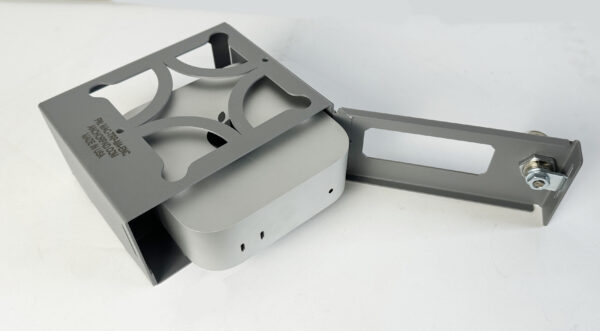
Enclosure with hinged door open

Locked and secured
Mounting Options
Every Mac Trap M4 ships with screw-down hardware. You have four mounting positions:
- Desktop surface. Screw holes on the bottom attach directly to a desk or table.
- Undermount. Screw holes on the top allow you to attach the enclosure to the underside of a desk, keeping the Mac Mini hidden and out of the way.
- Wall mount. The same screw holes work for mounting to a wall or the side of a desk.
- VESA mount. 75x75mm and 100x100mm VESA hole patterns on the bottom let you attach the enclosure directly to the back of a monitor.
If you can’t drill into the surface, BMS offers an optional high-bonding adhesive pad (+$15) that sticks to any smooth, flat surface. It’s strong enough to resist a pull, but the screw-down option is more secure for high-traffic environments.
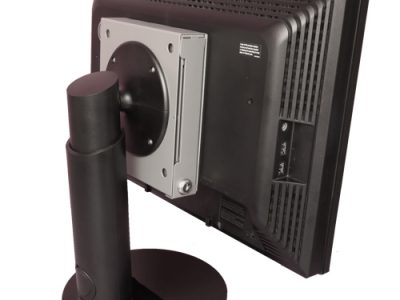
VESA-mounted behind a monitor — keeps the Mac Mini completely hidden
Port Access and Ventilation
The enclosure has cutouts on the back for all Mac Mini M4 ports: power, HDMI, USB-C, USB-A, Ethernet, and headphone jack. You don’t need to open the enclosure to plug in or disconnect peripherals.
The M4 Mac Mini has its power button on the bottom of the unit, which would normally be inaccessible inside an enclosure. BMS designed the Mac Trap M4 with a raised “false floor” and a rear cutout that gives you access to the power button without opening the cage. This raised floor also creates an air gap underneath the Mac Mini, improving airflow during 24/7 operation.

Rear cutouts provide full access to all Mac Mini M4 ports while locked
Mac Studio Security Enclosure: For Heavier AI Workloads
If you’re running larger local models (13B parameters and up) or using the Mac Studio as a dedicated AI server, the BMS Mac Studio Trap is the enclosure you need. Internal dimensions are 8.07″ wide x 8.05″ deep x 4.00″ tall, fitting all current and prior Mac Studio models.
The Mac Studio Trap shares the same mounting options as the Mac Trap M4: screw-down, undermount, wall, VESA, and optional adhesive. It also includes a 2-foot braided steel security cable kit for locking down peripherals like your monitor, keyboard, and external drives.
The enclosure has a thru-way hole for threading additional security cables, which is useful if you’re running a Mac Studio as a shared workstation where peripherals are also theft targets.
Both enclosures are $154.99 and made from steel at the BMS facility in Brea, California.
How Much Does a Mac Mini Security Enclosure Cost?
BMS Mac Mini security enclosure pricing is straightforward. The Mac Trap M4 for the current M4 chip Mac Mini is $154.99. The original Mac Trap for M1 and M2 chip Mac Minis is $169.99. The Mac Studio Trap is $154.99. All prices include the enclosure, cam lock with keys, and screw-down mounting hardware.
The optional high-bonding adhesive pad adds $15 if you can’t drill into your mounting surface. No other accessories are required for a complete installation.
For organizations deploying multiple Mac Mini security enclosures, volume pricing is available. Email sales@locdown.com or call (800) 872-9562 for a quote. All enclosures can be keyed alike at no extra cost when specified at order time.
Which Mac Mini Security Enclosure Do You Need?
Apple has used three different Mac Mini form factors in recent years. The Mac Mini security enclosure you need depends on which model you have:
| Your Mac | BMS Enclosure | Internal Dimensions | Price |
|---|---|---|---|
| Mac Mini M4 (2024) | Mac Trap M4 | 5.14″ x 5.14″ x 2.17″ | $154.99 |
| Mac Mini M1 / M2 (older) | Mac Trap | 7.7″ x 7.7″ x 1.6″ | $169.99 |
| Mac Studio (all models) | Mac Studio Trap | 8.07″ x 8.05″ x 4.00″ | $154.99 |
If you’re buying a new Mac Mini specifically for OpenClaw, the M4 with 24GB of unified memory is the most commonly recommended configuration. That’s the $999 model, and the Mac Trap M4 enclosure fits it perfectly.
For organizations deploying multiple units, all BMS enclosures can be keyed alike so your IT team manages one key across every machine. Standard color is gray to match the Mac Mini’s finish. Black and white are available as special orders.
Frequently Asked Questions
Will a Mac Mini security enclosure cause overheating?
No. The Mac Trap M4 has a raised false floor that creates an air gap underneath the Mac Mini, where Apple placed the intake vents on the M4 model. The rear cutouts also allow heat to dissipate. The Mac Mini M4 draws only 15 watts at idle, and the enclosure does not restrict its thermal performance during 24/7 operation.
Can I access all ports with the Mac Mini security enclosure locked?
Yes. The rear of the enclosure has cutouts aligned with the Mac Mini M4’s port layout: three USB-C (Thunderbolt 4), one USB-A, HDMI, Ethernet, headphone jack, and power. You can connect and disconnect peripherals without unlocking the cage.
Does the Mac Mini M4 have a Kensington lock slot?
No. Apple removed the Kensington slot from the Mac Mini M4 redesign. A cable lock is not an option for this model. A Mac Mini security enclosure bolted or adhered to a surface is the only way to physically secure it.
Can I mount the Mac Mini security enclosure behind my monitor?
Yes. The Mac Trap M4 has VESA 75x75mm and 100x100mm hole patterns on the bottom. If your monitor has an available VESA mount point, you can attach the enclosure directly to the back of the monitor, keeping the Mac Mini completely out of sight.
I’m deploying 20 Mac Minis across a school. Can all enclosures use the same key?
Yes. Specify “keyed alike” when ordering and all enclosures will ship with matching locks. This simplifies key management for IT and facilities teams. Volume pricing is available for multi-unit orders. Email sales@locdown.com.
Running an always-on AI agent deserves always-on physical security. Browse all BMS Apple security enclosures or call (800) 872-9562 to find the right Mac Mini security enclosure for your setup.



Leave a Reply